

Have you ever wondered if you could showcase your products on Amazon just like you do on Instagram—through engaging posts with eye-catching images, captions, and stories? Well, you can! Amazon Posts let brands share content directly where shoppers are browsing, helping to boost visibility and build trust.
Amazon Posts allow brands and sellers to share eye-catching images and stories about their products, directly where shoppers are browsing. These posts appear on product pages, related product pages, and other important positions on Amazon, helping you grab attention, tell your brand story, and build trust with customers!
In this blog, we’ll explore how Amazon Posts work, why they’re important for brands and sellers, and how you can use them to drive sales on Amazon. Also, we’ll share tips to create posts that stand out and boost your sales.
Let’s get started!
What Are Amazon Posts?
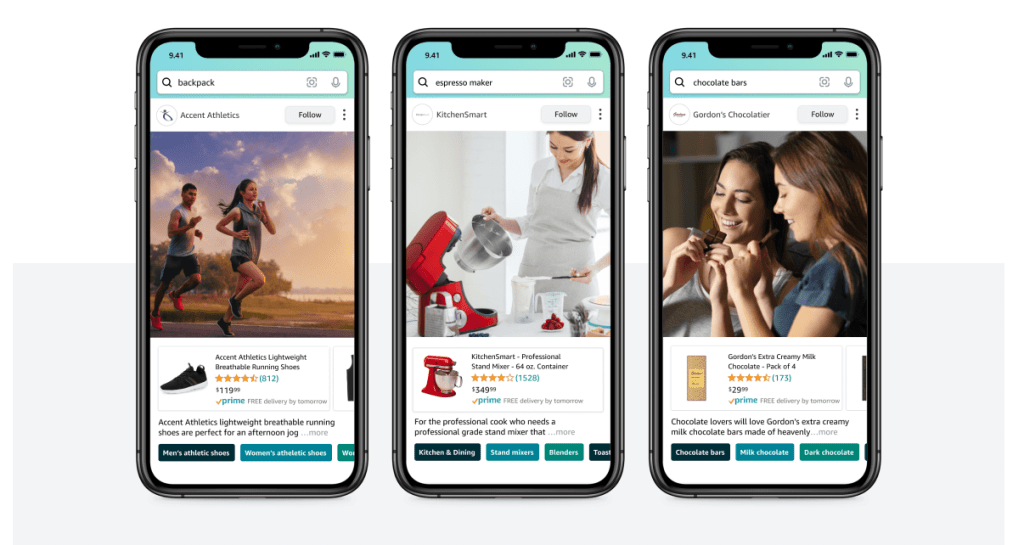
Amazon Posts are visual, discoverable content that lets brands share lifestyle images or videos along with product information. They allow shoppers to explore your products while browsing the Amazon store.
Through Posts, brands can share authentic visuals, videos, and captions to connect with customers.
The primary aim of Posts is to increase awareness, spark interest, and drive engagement.
Shoppers can interact with Posts in various ways:
- Likes: Indicate interest and show which content resonates with your audience.
- Saves: Help shoppers bookmark Posts for future consideration.
- Clicks: Direct shoppers to product detail pages or Brand Stores for more information and purchases.
- Shares: Allow customers to share Posts with friends via social media or messaging apps.
- Follows: Let shoppers follow brands to see updates and new content in their feed.
Amazon Posts work best when combined with Amazon PPC ads like Sponsored Brands and Sponsored Products. This strategy increases visibility, drives traffic, and improves the shopping experience.
- Use Sponsored Brands with Posts – Direct shoppers from Posts to your Brand Store, increasing brand awareness.
- Combine Posts with Sponsored Products – Highlight products in Posts to boost engagement and conversions.
- Link Posts to Your Brand Store – Ensure a seamless shopping experience by connecting Posts to your Brand Store.
How and Where Do Amazon Posts Show Up?
If you are wondering where are Amazon posts located, you must note, Amazon automatically determines the placement of your Posts. Their algorithm ranks and displays content across mobile, web, and desktop platforms.
Now, let’s also understand where Amazon Posts show up:

- Brand Store Feeds
- A dedicated feed allows customers to explore all brand content.
- Related Product Pages
- Posts introduce products to shoppers exploring similar items.
- Search Results
- Posts can appear within search results, reaching a wider audience.
- Follow Timelines
- Followers see updates in their timelines, creating direct engagement.
- Category and Style Feeds
- Feeds organized by category or style showcase relevant products.
- Sponsored Brands Ads
- After Posts are converted into Sponsored Brands ads, they appear in premium locations such as the top of search results, within search pages, and on detail pages, increasing visibility and reach.
Eligibility Criteria for Posts
To use Amazon Posts, sellers and vendors must meet specific eligibility requirements.
Account Requirements:
- You must be a professional seller, vendor, or an agency representing a vendor.
- Sellers must be registered brand owners through Amazon Brand Registry.
- First-time users must create a brand profile before accessing Posts.
Permissions to Access Posts:
- Vendors:
- You need to be a user on the vendor account.
- If you don’t have access, request an invite from your account admin.
- Admins can add users via User management in the advertising console and assign roles such as editor or admin.
- Sellers:
- You must be a user on the seller account with View and Edit permissions for Posts.
- Admins can provide access through User permissions and manage permissions to Posts.
Product Requirements:
- Only include products that you own or are authorized to sell.
- Ensure products meet the guidelines outlined in Amazon’s Product Acceptability Policies.
Who Can Use Posts?
Vendors and professional sellers registered in the Amazon Brand Registry with a live brand profile can use Posts.
Countries Where Posts Are Available
Currently, Posts are available only in the United States.
Post Format and Functionality

Amazon Posts have five customizable elements that help brands present their products effectively:
A. Profile Banner: Shows the brand’s name and logo. (Logos must follow Amazon’s guidelines, such as using RGB color format and a 1:1 aspect ratio.)
B. Custom Image: Images provided by the brand highlight product features and tell a story. (Images must meet resolution requirements of 640×320 pixels or larger and cannot include animation.)
C. “Show Product” Icon: This lets shoppers reveal or hide a product card. The card shows details like price, star rating, and Prime eligibility for the product featured in the Post.
D. Caption Text: Custom captions allow brands to describe product features, emphasize their message, and include a call to action.
E. Category Tags: Amazon adds category tags to Posts automatically. Clicking on a tag takes shoppers to a vertical feed of similar Posts within that category.
Cost of Amazon Posts
Amazon Posts are completely free to use, making them an excellent option for brands looking to expand visibility without increasing Amazon advertising costs. There are no additional charges for creating or sharing Posts
How to Create Amazon Posts?
Amazon Posts help brands connect with customers by sharing engaging content in key shopping areas. Below is the step-by-step process for creating Amazon Posts, followed by important requirements you must follow.
Step-by-Step Process to Create Amazon Posts
- Set Up Your Brand Profile
As we discussed above in the ‘Eligibility for Amazon Posts’ section, first you will need to create a Brand Profile (if you are a first time user.)
Visit the “Create Your Brand Profile” section in the Amazon Ads Console for guidance.
- Access the Posts Feature
- Log into the Amazon Ads Console.
- Click on the Brand Content icon, then select “Posts.”

3. Create a Post
- Click on “Create Post.”

- Choose between an Image Post or Video Post.
4. Upload Content
- Image Post: Use a high-resolution image (1200 x 628 pixels or larger, under 5MB).
- Video Post: Upload a vertical video (1080 x 1920 pixels, 9:16 aspect ratio, under 500MB).

5. Add Details
- Write a caption that highlights product features or communicates a call-to-action.
- Add up to five ASINs your brand owns or is authorized to sell.
6. Set Scheduling Options
- Choose a start and end date for your Post. You can publish it immediately or schedule it for later.
7. Submit for Review
- Review all details before submission.
- Click “Submit for Review.” Posts will be reviewed by Amazon within 72 hours.
Posts Moderation
Every Post goes through Amazon’s moderation process before it goes live. Moderation ensures the Post complies with Amazon’s guidelines and policies.
Important Moderation Policies:
- Use your brand name in the profile, not a third-party name, unless authorized.
- Posts must not include contact details or misleading content.
- Avoid pressuring language, such as “Last Chance” or “Don’t Miss Out.”
- Ensure Posts are error-free and meet Amazon’s quality standards.
- All claims must align with the product detail page and be supported by evidence.
Moderation Process:
Usually, the moderation team from Amazon, approves or rejects an Amazon Post in 24 hours. But sometimes, it can take longer, even as much as 72 hours. You can track the Post’s status in the Posts Dashboard:
- Draft: Saved but not submitted. Complete the steps to submit.
- Pending Review: The Post is under review.
- Live: The Post is approved and visible.
- Rejected: Edit and resubmit if the Post violates guidelines.
- Scheduled: Approved Posts set to go live at a specific time.
- Withdrawn: The Post was removed and is no longer live.
You must note if your post gets Rejected, you can improve it and resubmit after addressing the issues mentioned in the status message.
Content Requirements and Product Acceptability Guidelines for Amazon Posts
There are specific guidelines to ensure your Amazon Posts meet Amazon’s standards. These include:
Content Requirements
- Posts must suit a general audience and provide accurate information.
- The Post language must match the Amazon site language.
- Content must not contradict the product detail or landing page.
- Only products you own or are authorized to sell can be promoted.
- Claims must be substantiated with evidence and not mislead customers.
- Captions should remain short, concise, and unique.
Prohibited Content
- No use of Amazon trademarks or improper references.
- Contact details like emails, phone numbers, or QR codes are not allowed.
- Content must not glorify violence, hate, or illegal activities.
- Avoid pressuring language, such as “Last Chance” or “Don’t Miss Out.”
- Sexual, obscene, or culturally inappropriate content is prohibited.
- Claims must not be misleading, false, or exaggerated.
Prohibited Images
- Violent, obscene, or sexual images are not allowed.
- Weapons cannot appear in threatening or violent contexts.
- Alcohol-related images must not promote unsafe or excessive consumption.
- Minors must be portrayed in safe and appropriate settings.
Call to Action (CTA) Guidelines
- CTAs must be clear and precise, avoiding vague terms like “Click Here.”
Claims and Substantiations
- Claims must align with the product detail page and be truthful.
- Awards and accolades must be no older than 18 months.
- Comparative claims require independent sources and citations.
Post Profile and Caption Guidelines
- Profile names must accurately reflect your brand.
- Captions and images must not contradict each other or the landing page.
- Captions should remain concise, clear, and avoid repetition.
Product Acceptability Guidelines
Amazon has strict rules on what products can be promoted in Posts. Product acceptability refers to ensuring that all promoted items comply with Amazon’s policies, legal requirements, and customer trust standards. Any product violating these guidelines may lead to post rejection or account issues.
Let’s understand the key guidelines to ensure your Posts meet Amazon’s approval criteria.
General Requirements
- You can only promote products you own or are authorized to sell.
- Posts must truthfully and accurately describe the product being promoted.
Prohibited Products
Amazon does not allow the following products in Brand Posts:
- Alcoholic beverages, including non-alcoholic beer or wine.
- Adult products, including explicit content and enhancement items.
- Fat burners, metabolism boosters, or libido-enhancing products.
- Medical devices intended for professional use.
- Tobacco products, vapes, and related accessories.
- Weapons, ammunition, and assault-related items.
- Prescription drugs or products claiming to diagnose or treat diseases.
- Products violating Category, and Amazon Product Listing Restrictions.
How to Measure the Performance of Amazon Posts?
Evaluating how your Amazon Posts perform helps improve your content strategy and achieve better results. You can track key metrics related to the Performance within the Insights Dashboard.

These metrics show how customers interact with your Posts and provide useful data for making changes:
- Viewable Impressions: Number of times a Post was visible to customers (at least 50% of the Post must be on the screen for at least one second).
- Reach: The number of unique customers who saw your Post. Reach is available for specific date ranges: 1 day, 7 days, 30 days, 60 days, and 90 days.
- Clicks to Detail Page: The number of clicks directing customers to your product detail pages.
- Clicks to Follow: The number of times customers clicked the “Follow” button on your Posts.
- Clicks to Store: The number of clicks to your Brand Store from your Posts.
- Engagement: Total clicks on your Post, including clicks on the image, caption, brand header, and product links.
- Engagement Rate: Calculated by dividing engagement by viewable impressions.
Apart from these metrics shared above, there are some other metrics too that you can track related to Amazon Posts. These include:
- Conversions: Track how many product views, add-to-carts, and purchases are directly linked to your Posts.
- Top Performing Content: Identify Posts with the highest reach, engagement, and conversion rates to understand what works best for your audience.
- Time-Based Trends: Analyze performance over specific periods to understand when Posts are most effective.
What are the Benefits of Using Amazon Posts?
There are several benefits of using Amazon Posts. These include:
- Drive Brand Visibility
Amazon Posts help brands increase visibility by showcasing products in key shopping areas. Customers interacting with Posts are 33.2% more likely to add products to their cart and have a 2.5% higher purchase rate during their shopping journey.
- Test Marketing Strategies for Free
Amazon Posts allow brands to experiment with marketing strategies at no cost. You can use this platform to test different types of content, captions, and imagery to understand what resonates most with your audience.
By monitoring performance metrics such as impressions, clicks, and engagement rates, you can refine your approach without committing to a paid campaign upfront.
- Simplify Shopping for Customers
Posts link directly to product pages, making it easy for shoppers to transition from browsing to buying. As per official Amazon statistics, customers engaging with Posts tend to purchase 21.7% more units per session.
- Access Key Metrics
The Posts dashboard tracks clicks, impressions, reach, and video views. These insights let you measure how well your content performs and refine your strategy.
- Grow Your Amazon Followers
Regularly posting branded content helps grow your Amazon followers and strengthens relationships with shoppers. Brands with 10 or more live Posts see 2.9x more Store visits and 4.1x more followers compared to those with fewer Posts.
Amazon Posts Best Practices (With Examples)
Now let’s look at some Amazon Posts best practices that you can leverage to maximize your results:
- Post Consistently to Stay Visible
Posting regularly helps your brand maintain visibility and stay top of mind for shoppers. Aim to post three to five times per week to create a steady presence.
Let’s look at Ruko’s Example to best understand how they used Posts to boost their engagement.
Ruko posted daily using lifestyle imagery, which increased traffic to their Store by the second month. This strategy contributed to 1.95 million USD in ad-attributed sales and 281K Store visitors in 2021.
| Bonus: Learn how to create an Amazon Storefront for your brand. |
- Scheduling Posts for Efficiency
Batch-schedule Posts to maintain a consistent posting frequency. Use Amazon’s Posts publisher to schedule Posts in advance, ensuring you always have fresh content live.
- Be Patient with Results
New Posts can take 3–4 weeks to generate impressions. Monitor performance metrics regularly and adjust your strategy as needed.
- Optimize for Mobile Devices:
Ensure your posts are optimized for mobile viewing, as more than 90% of shoppers view posts on their phones. Use high-quality images that load quickly and maintain clarity even on smaller screens. Stick to square or vertical formats, like 9×16, to create an engaging experience.
- Leverage Lifestyle Images to Create Relatable Posts

Showcase products in natural, relatable settings using lifestyle photography. Focus on creating a mobile-friendly experience with aspect ratios like 9×16, 4×5, or 1×1. Use the rule of thirds to position your product attractively within the image. For example:
- A silicone baking cup showcased alongside colorful cupcakes to illustrate its use.
- A sectional couch placed in a realistic living room setup.
- A first-aid spray depicted being used outdoors, highlighting a specific use case.
Example: Dream Pairs Case Study
Dream Pairs posted three times daily, using lifestyle imagery and shoppable image widgets. This strategy drove 3,500+ impressions per Post, reached 1.1 million shoppers, increased Store views by 50%, and boosted order sizes by 74%.
- Avoid Distracting Elements in Your Images

Minimize overlay text to ensure the image remains the focus. Avoid collages, unrealistic visuals, or packshot images, as these can harm engagement and trust. For example:
- Avoid images with excessive text, like a smart plug with too many details.
- Steer clear of collages, such as before/after whitening strip photos.
- Refrain from using unrealistic visuals, like a coffee image with inconsistent lighting.
- Do not use packshot images, such as a standalone bottle of mouthwash.
- Align Content with Seasonal Themes
Create Posts based on seasonal or event-based trends, such as holiday gifts in December or back-to-school supplies in August. This helps attract shoppers actively searching for related products.
- Write Captions That Match Shopper Intent
Craft captions that resonate with your audience’s needs and interests. For example, highlight product features or benefits that are relevant to their lifestyle.
- Stay Flexible and Creative
Monitor trends on social media and Amazon to inspire new content ideas.
Experiment with styles and captions using A/B testing. For example, you can test two captions: one highlighting discounts and another emphasizing product quality. Also, test images showcasing the product alone versus in a lifestyle setting.
- Tag Multiple ASINs to Maximize Reach
Tagging 3 to 5 products in each Post can increase click-through rates by 37%. Ensure all tagged products are relevant to the image to avoid confusion.
- Promote Best-Selling Products for Better Engagement
Highlight products with 4+ star ratings and 15+ reviews. Posts featuring top sellers gain 95% more impressions and 82% more clicks on average.
- Diversify ASIN Tagging Across Posts
Avoid tagging the same ASIN repeatedly in multiple Posts. Instead, rotate ASINs to increase product exposure and appeal to a broader audience.
- Highlight New Products in Relevant Posts
Use Posts to introduce new products and highlight their features. Pair this with lifestyle images to attract attention and drive interest among shoppers.
Challenges with Amazon Posts
Amazon Posts is a powerful tool for brand visibility and engagement, but it comes with challenges. Addressing these issues can help brands optimize their performance.
1. Delayed Impressions for New Posts
As discussed above, new Posts may take 3–4 weeks to generate impressions. Around 20% of Posts see no impressions within the first week, and 10% fail to gain impressions in the first month. Brands must remain patient and monitor performance over time.
2. Limited Insights and Reporting
Amazon Posts does not offer downloadable reports within the Measurement and Reporting section. While advertisers can export certain metrics, the lack of detailed reports limits deeper campaign analysis.
3. Content Quality Concerns
Posts with poor-quality images, excessive text, or irrelevant captions are deprioritized. This reduces their visibility and engagement. Ensuring adherence to Amazon’s strict content guidelines is important to avoid rejection or low performance.
4. Moderation and Approval Delays
Posts go through Amazon’s moderation process, which can take up to 72 hours. Non-compliance with policies may result in rejection, requiring revisions and re-submission, delaying campaigns further.
Tools and Services to Simplify Amazon Post Creation
Creating Amazon Posts becomes easier with the right tools and services. These options help with content creation, strategy, and management to ensure your posts are engaging and comply with Amazon’s guidelines.
Management Services
- Thrive Internet Marketing Agency: They manage the entire Amazon Posts process, from profile creation to analytics tracking. Their team develops content strategies and ensures posts adhere to Amazon’s rules while optimizing for better engagement.
- SunTec India: This agency specializes in curating high-quality content for Amazon Posts. They focus on creating brand feeds, developing strategies to maximize reach, and ensuring compliance with Amazon’s creative policies.
Content Creation Tools
- Visual Design Platforms: Tools like Canva and Adobe Spark simplify the creation of eye-catching images. These platforms offer templates tailored to Amazon’s image requirements, making it easy to produce professional visuals.
Copywriting Services
Platforms like Fiverr and Upwork offer access to expert writers. They can write engaging captions that follow Amazon’s content guidelines for Posts and help you create Posts that appeal to your audience.
Boost Trust & Sales With
Product Reviews Using AdNabu!
Integrate with top product review apps to display verified reviews.
Increase buyer confidence by showcasing real user experiences.

Sync review data with Google Shopping for better ad management.
Conclusion
Amazon Posts provide an effective way to connect with shoppers, build trust, and drive sales when you sell on Amazon. By creating engaging content, integrating Posts with other Amazon Ad products, and overcoming challenges like delayed impressions, you can maximize their potential.
Use Posts strategically to boost visibility and grow your brand’s presence on Amazon.
Good luck!
FAQs
- Where can I see Amazon Posts?
Amazon Posts appear on product pages, related product pages, and category feeds. They are also visible in a brand’s Store feed and customers’ timelines if they follow your brand.
- Is Amazon Post free?
Yes, Amazon Posts are completely free to create and share. There are no additional charges for using this feature.
- How to create a Post on Amazon?
You can create a Post by accessing the Amazon Ads Console. Choose “Posts” under the Brand Content section, upload high-quality images or videos, add captions, tag relevant ASINs, and submit for review.
- Can I repurpose content from other social media platforms for Amazon Posts?
Yes, you can repurpose content from social media as long as it meets Amazon’s content guidelines and is relevant to your brand.
- Are there any content guidelines for Amazon Posts?
Yes, Posts must provide accurate information, avoid prohibited content (e.g., misleading claims), and follow Amazon’s acceptability standards for images, captions, and product eligibility.
- What types of content work best for Amazon Posts?
Lifestyle images, product use cases, and content aligned with seasonal themes perform best. High-quality visuals and concise captions improve engagement.
- How often should I post on Amazon Posts?
Consistency is key; aim to post three to five times per week. Regular updates keep your brand visible to shoppers.
- Can customers follow my brand on Amazon?
Yes, customers can follow your brand through Amazon Posts. Followers see your updates in their personalized feeds.
- Can I target specific audiences with Amazon Posts?
Amazon Posts do not allow direct audience targeting. However, they reach audiences based on product categories and customer interests.
- Are Amazon Posts available in all countries?
Currently, Amazon Posts are only available in the United States.
- Can I schedule Amazon Posts?
Yes, you can schedule Posts using the scheduling options in the Amazon Ads Console. This ensures regular content updates without manual effort.


