

Choosing the right product feed management solution can make or break your e-commerce business. GoDataFeed has been a significant player in this space, offering a variety of features that many find beneficial. However, no tool is perfect, and that’s why it’s crucial to explore GoDataFeed competitors as well.
This blog aims to give you an unbiased look at GoDataFeed and its top competitors, helping you weigh the pros and cons to make an informed decision.
Let’s get going.
Table of Contents
AdNabu

AdNabu is built exclusively for Shopify, providing seamless product feed management to support merchants’ marketing goals. It carries the prestigious “Built for Shopify” badge, reflecting its adherence to Shopify’s quality standards.
With a user base of over 8,000, AdNabu is known for its reliable customer support and robust features.
Additionally, it extends its functionality to platforms like Google Shopping, Facebook, Instagram, X (formerly Twitter), Bing Shopping, Pinterest, Snapchat, and TikTok. This makes it an ideal choice for Shopify Plus store owners aiming to grow their reach and engage with a larger audience.

Features
AdNabu uses the sophisticated GPT-4o-mini model to optimize titles, descriptions, product details, and product highlights.

2. Keyword Optimization: AdNabu sources fresh keywords from Google’s Keyword Planner for your product listings. This is to ensure that your listings align with trending search terms and improve visibility across multiple advertising platforms.

3. Bulk Editing: AdNabu allows bulk editing of over 70 product fields, such as titles, descriptions, brand, color, material, and more. Update product details quickly for individual items, entire catalogs, or specific variants in just a few steps.

Robust Support: AdNabu allows you to show verified Shopify product ratings on your Google Shopping ads. It offers integration with popular review platforms like Judge.me, Junip, Review.io, Loom, etc.

5. Shopify Metafields: Merchants can use metafields within the app to send detailed product data, including optional attributes, to various marketplaces. This helps a lot in improving product feed quality and ensuring better performance across platforms.

AdNabu supports the generation of multilingual Google Shopping feeds, which allows you to advertise products in the native languages of your potential customers.
The app is compatible with over 30 languages that are supported by Google Merchant Center and also works seamlessly with more than 1000 translation apps that are approved by Shopify.

Shopify merchants can also create multicurrency feeds and enable local currency payments in over 90 currencies in AdNabu.

8. Customized Marketplace URLs: AdNabu creates feed URLs customized for individual marketplaces such as Google Shopping, Bing, Facebook, Instagram, TikTok, Snapchat, and Pinterest. These URLs are crafted in line with each platform’s specific guidelines and requirements.

9. Shopify Flow Integration: AdNabu allows you to integrate with Shopify Flow, enabling you to set up automated workflows for product listing tasks such as opting in or out of Google Shopping Feed, enriching product data with essential attributes, and more.

10. Export and Import Functionality

AdNabu’s Google Shopping Feed app makes bulk product updates easy with its CSV export and import feature. You can export product data for quick edits or import CSV files to update your Google Feed effortlessly.
Also, through this feature you can download any language or country specific feed of your choice in AdNabu. This helps to manage listings for different markets and ensure accuracy across all feeds.
User Interface
AdNabu:

AdNabu is designed to make product feed management straightforward and efficient, focusing on Shopify and Shopify Plus platforms. Here are some details about our user-interface:
- Intuitive and User-Friendly: The interface of AdNabu is straightforward and easy to use.
- Unified Platform: We allow you to manage your Shopify and other marketplace product feeds from one single place, easing the task of running a multi-platform e-commerce business.
- Easily Accessible Features: And, all the features you need are just a click away, contributing to an efficient user experience.
Wait. We will not ask you to believe it just like that. See, what one of our customers had to say:

Pricing

- Starter Plan ($0) – Free plan supporting up to 1,000 products, unlimited variants, automatic syncing, Shopify Markets integration, bulk editing, and keyword suggestions.
- Basic Plan ($29.99/month or $299/year – Save 17%) – Includes Starter features, plus unlimited products, multi-language and multi-currency support, and integrations with Facebook, Instagram, TikTok, Pinterest, and more.
- Advanced Plan ($79.99/month or $799/year – Save 17%) – Comes with all Basic features, metafield customization, product review integrations, hourly sync, Shopify Flow integration, feed rules, blocklist, and 20,000 AI credits monthly.
- Plus Plan ($249.99/month or $2,399/year – Save 20%) – Includes all Advanced features, priority support, instant sync from Shopify and to Google, unlimited rules & flows, and 100,000 AI credits per month.
Custom Plans – You can also get custom quotes by contacting our team at support@adnabu.com!
Customer Support
AdNabu offers 24/7 support from certified experts to help with any issues, making it ideal for Shopify Plus stores. Support is available via live chat, email, and Zoom calls for quick assistance.
A detailed help center is also available for common questions and step-by-step guides.
Customer Reviews and Ratings
If you’re still on the fence about choosing between AdNabu and GoDataFeed, customer reviews can offer valuable insights. Ratings on Shopify tell a compelling story.
AdNabu enjoys an average rating of 4.7 stars, generously given by 796 merchants. On the other hand, GoDataFeed trails behind with an average rating of 4.1 stars, which is based on only 25 reviews.

This graph visually illustrates the strong positive feedback AdNabu has received on Shopify compared to GoDataFeed, especially when considering the volume of reviews. Our high ratings across a large number of Shopify merchants suggest consistent quality and reliability in our services.
Pros and Cons of AdNabu
Pros:
✅Built for Shopify: AdNabu is specifically built for Shopify merchants. This focus allows for a streamlined experience that is highly aligned with the specific needs of Shopify store owners.
✅Advanced AI Capabilities: Using the GPT-4o-mini model, AdNabu offers nuanced and targeted optimization for product listings. This includes data-driven keyword choices directly from Google’s Keyword Planner for better targeting and conversion rates.
✅Flexible Bulk Editing: AdNabu allows to bulk edit over 70 product attributes across thousands of products at once, saving users valuable time and effort in optimizing their product feeds.
✅Multi-language and Multi-currency Support: The platform allows for product feeds in multiple languages and supports real-time currency conversion for over 90 currencies. This is especially beneficial for businesses aiming to tap into global markets.
✅Robust Customer Support: AdNabu prioritizes customer service with rapid response times and live chat support. It offers free setup assistance and onboarding, making it easier for new users to get started.
✅High Customer Satisfaction Rate: AdNabu enjoys a 4.7 out of 5 rating, gathered from 790+ reviews on Shopify, signaling a high level of trust among its user base.
Cons:
❌Platform-Specific: While AdNabu proudly wears its ‘Built for Shopify’ badge, it does limit its reach to only Shopify merchants. This means that businesses using other popular e-commerce platforms like BigCommerce, WooCommerce, or Magento cannot take advantage of AdNabu’s specialized services.
❌Limited Analytics: AdNabu’s analytics features are focused on metrics like impressions, clicks, CTRs, and conversion rates. While these are extremely essential, some users may seek a more comprehensive analytics suite for in-depth insights.
Looking for a reliable GoDataFeed alternative for Shopify feed management?
Try AdNabu! It offers advanced AI capabilities, bulk editing, and multi-channel support!
| For a more in-depth comparison and additional information, feel free to check out our GoDataFeed alternative page. We’re confident you’ll see why AdNabu is the right choice for your Shopify Store. |
Feednomics

Feedonomics offers detailed data feed management and 24/7 support. It is useful for merchants seeking constant support and comprehensive control over their product catalogs.

Features
While both Feedonomics and GoDataFeed offer essential features for product feed management, Feedonomics, a notable GoDataFeed competitor, has a more comprehensive suite. It includes extras like order management and inventory synchronization, which are particularly helpful for businesses looking for an all-in-one solution.
User Interface
Feedonomics’ user interface prioritizes both automation and user accessibility. The layout flows logically, guiding you through feed creation and management in a sequence that makes sense—left to right on the navigation menu. It’s not just about ease; there’s room for customization too. You can adjust mapping fields and input extra data like text details.
Beyond these, the platform also syncs product data across multiple systems, allowing you to optimize listings for a range of shopping channels. This focus on user experience sets it apart when compared to GoDataFeed.

Integration Capabilities
Feedonomics, as a GoDataFeed competitor, integrates with major online shopping platforms like Google Shopping, Amazon, Walmart, and Facebook. It’s also compatible with BigCommerce, offering ease of integration for those using that platform. However, some users have expressed that Feedonomics doesn’t yet support newer platforms like TikTok for advertising.
Importantly, it’s worth noting that Feedonomics is not a standalone Shopify app, which might limit its appeal to Shopify users.

Pricing
Feedonomics focuses on enterprise-level clients and doesn’t publicly list its pricing. If you’re interested, you can fill out a form on their website to get a customized proposal.
Customer Support
When it comes to customer support, Feedonomics offers a more exhaustive list of options compared to GoDataFeed. You can reach out to Feedonomics through phone, email, chat, and even a ticket system. The company prides itself on offering a global team of feed specialists who provide ongoing, 24/7 support, aiming for an ideal customer experience focused on quality and collaboration.
So, if customer support is a high priority for you Feedonomics offers many avenues for help.
Customer Reviews and Ratings
In terms of customer reviews on G2, Feedonomics has a rating of 4.4 out of 5 stars based on 251 reviews. GoDataFeed follows closely with a 4.7 out of 5 stars rating but has fewer reviews (15).
Pros and Cons of Feedonomics
Pros:
✅ You can customize your feeds to meet specific needs, offering solutions for feed building and promotions.
✅ You get the ability to export to multiple platforms like Google Shopping and Facebook from a single source feed.
✅ Quick fixes on the feed side are facilitated by the platform’s transformers.
✅ Automatic syncing of promotions and inventory updates reduces manual labor.
Cons:
❌They do not yet support newer advertising platforms like TikTok.
❌The consumer-facing interface could be more user-friendly.
❌An automatic product-level suggestion feature is missing, which could make feed optimization easier.
❌Lack of features to directly measure the impact of changes made through transformers.
❌Some users find the platform’s pricing to be on the higher end.
Channable

Channable is a multichannel listing software that focuses on personalized marketing and smart ad campaigns. It provides solutions for businesses that are aiming for broader visibility across multiple platforms.

Features
Channable primarily focuses on feed management and PPC optimization, often positioning itself among the notable Channable competitors in the market. In feed management, users can build and adjust feeds for a wide range of online platforms, thanks to its ready-made templates and API connections. The platform’s rule engine adds another layer of control, allowing for custom rules that can manipulate data feeds through various conditions and adjustments.
When it comes to PPC optimization, Channable supports the automated creation of text ads for Google Ads and Microsoft Advertising using existing product data. Users also have the option to connect Analytics data to monitor product and channel performance.
User Interface

Just like GoDataFeed, Channable also provides a user-friendly interface, but with a navigation menu on the left. The Channable platform makes it simple to manage your data feeds. From the dashboard, you can track feed status, performance, and errors. The interface is designed for ease, letting you control product data with straightforward drag-and-drop actions.
Integration Capabilities
The platform has a set of integration options. You’ll find everything from Google Shopping to Amazon and other lesser-known platforms. They offer pre-made templates and API options to speed up the process.
Pricing
- Free Trial: Cost – Free
- LB Starter: $119/month, 15,000 items, 3 projects, 15 channels
- LB Standard: $179/month, Includes API Marketplaces and Advanced user rights
- LB Professional: $239/month, Adds PPC tool to Standard features
LB refers to large business.
Note: Channable offers more features at similar price points compared to GoDataFeed.
Customer Support
Channable’s customer support offers multiple ways to get in touch, including email and phone. They also provide self-help resources through their help center and Channacademy courses. Customers generally commend the support team for their friendliness, professionalism, and expertise.
Customer Reviews and Ratings
Channable has a 4.1-star rating from 48 reviews on Shopify.
Pros and Cons of Channable
Pros:
✅The platform connects to a diverse range of marketplaces and platforms.
✅ The platform offers tools for improving product visibility and conversions.
✅Users can track feed performance and even integrate Google Analytics.
Cons:
❌Some users find the platform and its features too complicated to use.
❌Slow responses and lack of comprehensive help are noted by some.
❌Some users wish for more advanced features or customization options.
❌The pricing may not suit everyone, especially those with many products or channels.
❌There are occasional issues with syncing and API integrations.
The pros and cons are mixed, which lines up with the range of reviews.
Make the switch to AdNabu from GoDataFeed. It
is a smarter, more trusted, and affordable feed management solution for Shopify Merchants!
DataFeedWatch

DataFeedWatch specializes in PPC optimization and analytics insights. It’s a suitable choice for merchants who want to focus on the performance of their ads across different platforms.

Features
DataFeedWatch offers a way to optimize your product feeds with rules and filters. It’s compatible with over 1000 shopping channels globally, making sure your product listings follow each platform’s specific guidelines.
Additionally, it has the capability to generate text ads for Google and Microsoft automatically. You can also manage and update orders across multiple marketplaces through a single dashboard. These features make it a strong alternative to GoDataFeed and other DataFeedWatch competitors such as Channable, Feedonomics, and Productsup.
User Interface

DataFeedWatch’s user interface is structured to offer a detailed look at your product data, rules, and analytics. It centralizes various optimization tools and gives real-time updates on feed statuses, including errors and warnings. This setup aims to facilitate a streamlined management experience for your product feeds.
Integration Capabilities
DataFeedWatch simplifies the complexities around various marketplaces like Amazon, eBay, and Walmart. Users can:
- Import data from diverse platforms such as Shopify and Magento.
- Consolidate data from different sources into a master feed.
- Export compliant and optimized product feeds to different marketplaces.
- Manage orders from all these marketplaces in one central place.
Pricing
DataFeedWatch offers a 15-day free trial across all its pricing plans.
- Shop Plan: $64/month, 1 shop, 1,000 products, 3 channels
- Merchant Plan: $84/month, 2 shops, 5,000 products, 10 channels
- Agency Plan: $239/month, Unlimited shops, 30,000 products, 150 channels
Customer Support
Users commend DataFeedWatch for its responsive customer support available via chat, email, and video calls. Free onboarding and feed setup assistance are provided.
Customer Reviews and Ratings
DataFeedWatch has a strong user rating of 4.8 on Shopify from 427 reviews, notably higher than GoDataFeed.
Pros and Cons of DataFeedWatch
Pros:
✅ DataFeedWatch offers customizable plans catering to various budget requirements.
✅ With a host of optimization tools like rules and filters, the platform is geared for performance improvement.
✅ Schedules feed updates and synchronizes inventory across channels to avoid stock issues.
✅ Allows conditional product data modification and filtering for channel-specific needs.
Cons:
❌DataFeedWatch offers no AI capabilities. It relies solely on manual rules and settings for feed optimization.
❌The platform also lacks a free trial or free tier for initial evaluation.
❌Restricted support for popular platforms like Amazon and Facebook, which hampers visibility.
❌The user interface lacks intuitive design elements, affecting ease of use.
❌Some users report the customer service to be slow or unresponsive at times.
Productsup

Productsup serves as a Product-to-Consumer (P2C) platform, offering seller and vendor onboarding along with product content syndication. It is designed for brands seeking an all-encompassing commercial solution, making it a noteworthy GoDataFeed alternative.

Features
Productsup, another name in our list of GoDataFeed competitors, enables easy data import and export, allowing users to bring in product data from a variety of sources and send it to multiple channels. Its data mapping functionality allows users to adapt their product information to meet the unique requirements of each channel.
The platform also offers data analysis tools for assessing the quality of product data and providing actionable insights. In addition, Productsup features product performance tracking capabilities, giving users the ability to monitor how their products are performing across different channels.
User Interface
ProductsUp offers a Data View for spreadsheet-like product data management and a unique Content Portal for sharing up-to-date catalogs. The platform also includes specialized User Management and Billing sections.

In contrast, GoDataFeed focuses on Smart Feeds for channel optimization and Dynamic Data features, offering a different approach to product feed management.
Integration Capabilities
Productsup supports a wide range of integrations. It works well with popular shop systems like Shopify, WooCommerce, Magento, and BigCommerce. For businesses using Product Information Management (PIM) systems, ProductsUp integrates with options like Pimberly, Akeneo, and Salsify.
It’s also compatible with digital asset management (DAM) systems such as Cloudinary, Acquia DAM, and Bynder. On the analytics front, you can link it with tools like Google Analytics, Adobe Analytics, and Facebook Pixel. The platform also allows you to sync your product data with key marketplaces, including Amazon, eBay, Walmart, and Alibaba.
Pricing
Productsup offers custom pricing. To get a pricing plan, users are required to fill out a form on their website.
Customer Support
Productsup offers a comprehensive customer support system. Users can reach out via email, with the expectation of a response within 24 business hours. Alternatively, phone support is available both in the US and EMEA regions.
For more personalized assistance, Productsup offers dedicated client success managers who can guide users through the platform’s features.
Customer Reviews and Ratings
Here are the ratings of Productsup on popular peer-to-peer review sites:
- G2: 4.3 (from 11 reviews)
- Capterra: 4.9 (from 33 reviews)
Pros and Cons of Productsup
Pros:
✅ Users appreciate Productsup’s robust features for managing large sets of product data. This makes it easier to gain insights, create reports, and ultimately save time.
✅ The support team is praised for its quick and helpful responses.
✅ Productsup is noted for its versatile feed management capabilities. Users find it especially useful for adapting product information to various sales channels.
Cons:
❌Several users find the platform’s interface to be initially challenging, requiring support from customer service to get accustomed to it.
❌Some users mention that the cost was more than they initially anticipated, affecting the overall perceived value.
❌Productsup doesn’t offer advanced AI capabilities for product feed management or background optimization, meaning users have to rely on manual settings and configurations, except for product descriptions.
❌The platform is not directly integrated with Shopify, making it less convenient for Shopify store owners who have to use third-party solutions for connectivity.
Rithum (ChannelAdvisor)

Rithum (ChannelAdvisor) has over 20 years of e-commerce experience and offers a centralized platform for integrating, managing, and optimizing merchandise sales across online channels. It is a strong option for businesses that are focused on growth and diversification.
Features
Rithum (ChannelAdvisor) offers an extensive range of features, such as marketplace integration, cataloging, brand analytics, and digital marketing automation. As a Godatafeed alternative, it excels in supporting over 300 global marketplaces and centralizing e-commerce operations.
User Interface
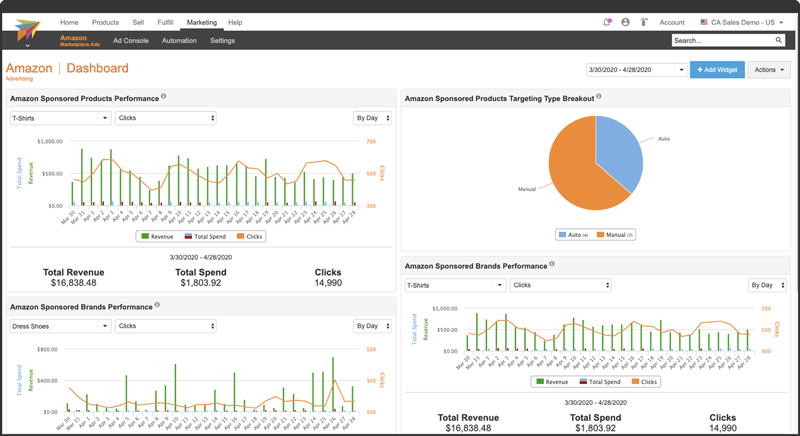
Rithum’s user interface offers a range of features designed for managing product listings and ad campaigns. While it aims to be user-friendly, some users find it sophisticated to the point of complexity, especially during the onboarding process.
The platform includes dashboards for analytics, account preference settings, and various modules for e-commerce tasks.

Integration Capabilities
Rithum (ChannelAdvisor) offers robust integration capabilities, allowing sellers to connect to different global marketplaces like Amazon, eBay, and Google. Through its API technology, the platform centralizes product data, inventory, and orders in one interface.
The platform even integrates with Criteo to extend advertising reach.
Pricing
Rithum’s (ChannelAdvisor) website doesn’t say anything about their plans. Their pricing model is customized to the client’s needs and revenue, usually charging a percentage of the monthly revenue. It’s notably pricier than GoDataFeed, with a minimum fee of $1,500/month (as per DataFeedWatch), making it suited for larger businesses.
Customer Support
Customer support options include filling out forms for expert contact, regional office calls, and specialist consultations.
Customer Reviews and Ratings

Rithum (ChannelAdvisor) has received mixed reviews, with some users praising its features and others critiquing its high cost and complexity. It holds a 3.8-star rating on G2, indicating room for improvement, especially when compared to GoDataFeed as an alternative.
Pros and Cons of Rithum (ChannelAdvisor)
Pros:
✅Rithum (ChannelAdvisor) allows sellers to manage various aspects like product data, orders, and inventory across multiple marketplaces in a single dashboard.
✅The platform helps in fine-tuning product listings by adjusting titles, descriptions, and keywords to meet specific marketplace requirements.
✅Rithum (ChannelAdvisor) comes with advanced repricing tools that automatically adjust product prices based on factors like demand and competition.
Cons:
❌The platform is not upfront about pricing, and charges can go up to $60,000 per annum, depending on usage. It may also include additional setup and monthly fees.
❌Users have reported that the platform is hard to set up and integrate with existing systems. Documentation and customer support have also been cited as weak points.
❌Some users feel Rithum (ChannelAdvisor) is not up-to-date with the latest e-commerce trends and technologies, making it less competitive.
❌Feedback suggests the UI is not user-friendly and the onboarding process is complicated, especially for those who opt for self-service due to limited API compatibility.
❌Rithum (ChannelAdvisor) doesn’t have a Shopify app.
CedCommerce

CedCommerce , next in the list of GoDataFeed competitors, focuses on offering integration services for e-commerce platforms. It aims to equip online merchants with tools for multi-channel selling through secure and optimized systems. Additionally, they incorporate AI technologies to provide customized solutions for managing various sales channels.
Features
CedCommerce provides sellers with a centralized interface for product data, inventory, and order management. They also offer optimization tools for product content, scalable integration tech, and advertising campaign management.
Sellers can make use of analytics tools to identify growth areas and measure performance across channels. They also offer managed services for those who prefer a hands-off approach.
User Interface

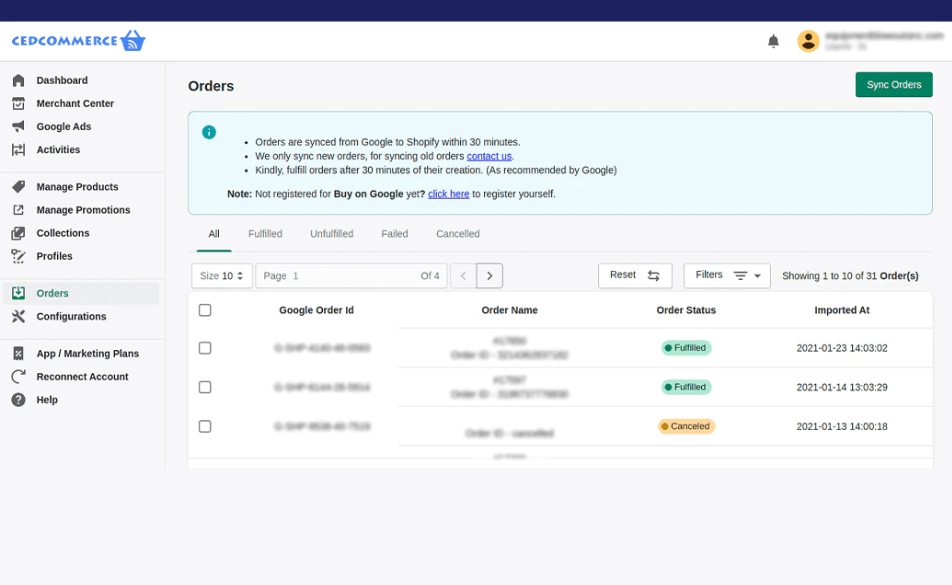
CedCommerce’s UI offers a straightforward layout with a focus on functionality. Features like a performance dashboard, easy-to-navigate menus, and specialized pages for product and order management help users handle their e-commerce tasks efficiently.
Compared with many CedCommerce competitors, the platform also makes it easier to set and monitor commissions, map category attributes, and access support whenever needed. Overall, the UI aims to provide a secure and scalable environment for managing various e-commerce tasks.
Integration Capabilities
CedCommerce is compatible with various e-commerce platforms like Magento, WooCommerce, Shopify, and others. The API technology enables easy sharing of product listings, orders, and shipping info across channels.
Pricing
CedCommerce has different Shopify apps for different marketplaces. So, as a merchant you will have to check their Shopify page in order to understand their pricing for a specific marketplace channel.
However, they don’t charge commissions, training, or hidden fees, but additional costs may apply for features not in the basic plan.
Customer Support
Options to get in touch with CedCommerce support include filling out contact forms on their website, direct calls or emails to regional offices, or using their Magento support system to create tickets.
Customer Reviews and Ratings
While individual experiences may vary on Shopify due to different marketplace apps, the overall sentiment on G2 is positive, with a 4.7 rating based on 156 reviews.
Pros and Cons of CedCommerce
Pros:
✅CedCommerce allows you to sell on platforms like WooCommerce, Shopify, Magento, and big marketplaces like Amazon and eBay. This broad range makes it a versatile GoDataFeed competitor.
✅Not just marketplaces, CedCommerce integrates with tools for shipping, accounting, and marketing, helping sellers consolidate operations.
✅Customer reviews frequently mention the company’s fast and professional support through various channels, including chat and email.
Cons:
❌Each integration comes with its own price tag, making it potentially expensive for sellers using multiple services.
❌You have to pay for the newest version of any extension you are using, which some customers find unfair.
❌Some users have reported occasional glitches or sync issues across different platforms.
❌Each marketplace, like Facebook, Amazon, etc., requires a separate app, adding both complexity and additional costs to the setup process.
High costs holding you back with GoDataFeed?
Try AdNabu—a budget-friendly, all-in-one feed management solution for Shopify merchants!

FeedHub by OneCommerce

FeedHub by Onecommerce offers features like feed optimization and localization. It is suitable for merchants who need specialized feed management for diverse markets.

Features
FeedHub by OneCommerce offers an array of features designed for efficient e-commerce management. You can create, manage, and optimize product feeds for Google Shopping, Facebook Shop, and TikTok Catalog with just a click, managing up to 10,000+ SKUs in a single location. The platform also ensures real-time sync of your product data across all channels, including automatic corrections for better conversions.
The service even comes with built-in image editing features for a polished look. AI-powered technology is used to score your feed quality and provide actionable suggestions for improvement. If you have a translation app, FeedHub allows for the localization of your product feeds, and their customer support is known for quick and focused responses.
User Interface

The user interface of FeedHub centers on simplicity. Its dashboard offers a straightforward overview of key metrics like store performance, feeds, and revenue, while its easy-to-navigate menu helps users move quickly between tasks like product sourcing and feed management.
The design is focused on efficiency, aiming to simplify the management of multi-channel product feeds for online sellers.
Integration Capabilities
FeedHub can handle a wide range of customization for each channel you want to target, including metafields mapping and category mapping. The app also provides real-time syncing and allows users to create multiple feeds for different channels.
Pricing
For FeedHub’s paid plans, you get a 14-day free trial.
- Starter: Free, 1 feed, 50 variants
- Standard: $9.90/month, 2 feeds, 500 variants
- Professional: $29.90/month, 5 feeds, 5,000 variants
- Advanced: $49.90/month, 8 feeds, 10,000 variants
Customer Support
FeedHub offers a variety of customer support options, including chat, email, phone, and tickets, as mentioned on their website.
Customer Reviews and Ratings
FeedHub has secured a strong customer rating, garnering 617 reviews on Shopify with an average rating of 4.9.
Pros and Cons of FeedHub
Pros:
✅FeedHub automatically updates your product data in real-time across all channels, eliminating manual work.
✅The app supports metafields mapping, fields mapping, and category mapping, letting you customize your product data extensively for each channel.
✅FeedHub offers data-driven recommendations and image optimization tools to enhance your feed quality and conversion rates.
Cons:
❌The app’s pricing is based on the number of imported variants and feeds, which some users find inflexible.
❌Some users have experienced bugs and compatibility issues, affecting import and syncing tasks.
❌The settings can be complex and hard to navigate for some users.
❌The app has been reported to sometimes fail at fetching new products for an extended period.
Flexify

Flexify is designed to work closely with Google Shopping and offers advanced features for that channel. It is ideal for businesses whose primary focus is Google Shopping.

Features
Flexify Google Shopping Feed zeroes in on fine-tuning your product data for Google Shopping. A standout feature is its capacity to link tags and metafields to specific product attributes, which can be helpful for sellers aiming to automatically improve product details.
The app also comes equipped with real-time performance analytics and assures that your listings meet Google’s particular standards.
User Interface
The Flexify app has a user-friendly interface with a simple design, making it easy to navigate. Its dashboard provides quick insights into your store’s performance and feed quality, offering a consolidated view that saves you time.

Integration Capabilities
Flexify allows integration with Shopify’s native Google sales channel. This allows you to maintain your existing setup while taking advantage of the more advanced features that Flexify has to offer, including efficient product feed management and straightforward advertising through Google Merchant Center and Google Ads.
Pricing
14-day free trial available for all plans.
- Small: $29/month, Up to 2,000 products
- Medium: $49/month, Up to 5,000 products
- Large: $79/month, Up to 9,000 products
Customer Support
Flexify’s customer support is available through various channels like chat, tickets, and emails.
Customer Reviews and Ratings
Flexify currently has a 5-star rating from 1 review on Shopify, which is not extensive.
Pros and Cons of Flexify
Pros:
✅Flexify lets you customize product details easily by mapping tags or metafields to product attributes, reducing manual effort.
✅It smoothly integrates with Shopify’s Google sales channel, making it ideal for those who are already using or want to use Shopify for online sales.
✅Real-time analytics on feed quality and performance help sellers make informed decisions quickly.
✅Designed to enhance buying experiences on Google Shopping, it aids in increasing both reach and conversions.
Cons:
❌Some users report bugs or issues, particularly with product imports and syncing feeds.
❌Lacks certain features like order and inventory sync, which are offered by other apps and may be essential for multi-channel sellers.
❌Few customer reviews on Shopify make it harder to assess the app’s overall reliability.
❌Absence of AI-based optimization features for those looking for more advanced capabilities.
❌No free plan, which might deter small businesses or those looking to try before they buy.
Sellbrite

Sellbrite offers a free plan, one-click integrations with large marketplaces, and advanced listing optimization features. It is designed for both small businesses and those looking to expand their presence on multiple platforms.

Features
Sellbrite is designed for sellers who prioritize multi-channel listing and inventory management. The software includes a range of tools, such as task automation through integrations with Shopify flow, Amazon FBA, and Deliverr, along with tips for avoiding errors and marketplace violations.
User Interface

Sellbrite’s user interface is simple and easy to use. The dashboard displays crucial metrics and sales insights, while other sections of the interface focus on listing creation and management, as well as inventory and order processing.
It has an order manager that lets you print shipping labels and fulfill orders from a single interface or automatically route orders to a fulfillment service.
Integration Capabilities
Sellbrite excels in its integration scope, connecting with a wide array of marketplaces and service providers. From Amazon and eBay to USPS and ShipStation, the software offers vast opportunities for integration. Additionally, an open API allows for custom integration solutions tailored to specialized needs.
Pricing
Merchants do get a 14-day free trial with Sellbrite’s paid plans.
Here are the details of their pricing plans:
- Forever Free: Free Up to 30 Orders Monthly
- Pro 100: $19/month, Up to 100 Orders Monthly
- Pro 500: $59/month, Up to 500 Orders Monthly
- Pro 2K: $99/month, Up to 2,000 Orders Monthly
Customer Support
Sellbrite offers robust customer support accessible via multiple channels including email and chat, alongside a comprehensive Help Center.
Customer Reviews and Ratings
With a 4-star rating based on 187 reviews on the Shopify App Store, Sellbrite has generally been well-received by its users.
Pros and Cons of Sellbrite
Pros:
✅Sellbrite integrates with various marketplaces and shopping carts, enhancing product exposure and customer reach.
✅The platform offers tools to simplify listing and prevent overselling.
✅An open API allows users to build custom integrations to suit specific needs.
✅Sellbrite offers a free limited plan and starts paid plans at $29 per month.
Cons:
❌Users find the platform’s Amazon integration less efficient.
❌The platform’s update time for inventory can lead to overselling issues and inaccuracies, as reported by some customers on Shopify.
❌Occasional glitches can affect the system’s functionality.
❌While some appreciate the support, there are complaints about slow responses and inadequate solutions
❌No AI capabilities are offered by Sellbrite.
You’ve heard about a bunch of different apps by now, and it’s totally okay if you’re feeling a bit overwhelmed. No worries, let’s jump to our final take on the matter.
Final Take: Which GoDataFeed Competitor wins?
If you need advanced order management or marketplace integrations, CedCommerce, Channable, or similar tools might be ideal. If budget isn’t a concern, Feednomics is worth considering for its premium features.
FeedHub by OneCommerce stands out for real-time updates and data-driven optimizations. Its customization features, like metafield mapping, make it a versatile choice. However, not all GoDataFeed alternatives are Shopify-specific, which may be a concern if you prefer a native app.
But then you have us. If you are looking for a powerful yet wallet-friendly solution, then look NO further than AdNabu. Not only are we a ‘Built for Shopify’ app, but we also offer a full suite of features that deliver bang for your buck. Our AI-powered features streamline everything from feed optimization to multichannel marketing, making your Shopify journey as smooth as it gets.
So go ahead, gear up for growth with AdNabu, and transform how you manage your product feeds.
Happy selling!
FAQs
- Which is the best product feed management software?
The best product feed management software depends on your specific needs. For example, if you are a Shopify merchant, AdNabu is an excellent choice. It offers advanced features tailored to Shopify stores, seamless integration, and high ratings from users.
If you are looking to expand across multiple channels, DataFeedWatch might be a better fit. It supports over 1,000 shopping platforms, making it ideal for businesses managing diverse marketplaces and ad platforms.
- How do I migrate from one software to another?
Migrating between product feed management apps involves a few key steps. Start by exporting your current data in a compatible format, such as CSV or XML, from your existing software. Next, prepare and clean the data to ensure it’s ready for import. After that, import the prepared file into your new app. Lastly, verify that all data has been accurately transferred.
If you’re switching to AdNabu, first disconnect your old platform from Google Merchant Center to prevent product duplication. Afterward, import your data into AdNabu and link it to your Google Merchant Center account. For any issues or questions, AdNabu’s support team is available to help.
- Does GoDataFeed provide Shopify-centric features?
While GoDataFeed does offer Shopify integration, AdNabu takes it a step further with AI-powered feed optimization. This means you’re not just managing feeds but actively improving them for better performance. If you’re after intelligent automation, AdNabu stands out among GoDataFeed competitors.
- What should I consider when looking for a GoDataFeed alternative?
When considering GoDataFeed alternatives, focus on features that match your e-commerce strategy, such as AI capabilities, customer support options, and how well it integrates with platforms like Shopify, BigCommerce, or let’s say even other maketplaces like Facebook, Amaozn, etc.
- Does GoDataFeed offer AI capabilities?
GoDataFeed offers basic AI capabilities for feed management. In contrast, AdNabu is integrated with GPT-4o-mini model Turbo for advanced AI-powered feed optimization. Additionally, AdNabu provides keyword suggestions directly from Google’s Keyword Planner, making it a more robust solution among GoDataFeed competitors.


