

Pay-per-click (PPC) advertising is the most sought-after business strategy for attracting relevant and qualified leads interested in their products or services. The results are outstanding, too. For every $1 spent, businesses make $2 on PPC.
Bidding on keywords plays a crucial role in PPC advertising, and you must use your bidding strategy correctly to see the results.
If you’re a business owner or advertiser searching for a keyword bidding process and strategies, this blog is for you.
This blog helps you understand the keyword bidding process and choose the right keyword bidding strategy for your business.
So, let’s get started!
Table of Contents
What is Keyword Bidding?
Keyword bidding is an auction in which advertisers compete to bid on keywords. Advertisers pay an amount for their ads to rank for specific keywords in Google search results or Ad Network.
This technique allows advertisers to show their ads on search results that drive traffic and leads.
Let’s understand bidding on keywords better through a real-time example:
Let’s consider a brand selling hair care products. They bid on keywords like ‘shampoo for curly hair.’

When a user searches for exact or related keywords, they appear in the search results. The ads shown in the above picture are optimized for the keyword ‘shampoo for curly hair.’
How does Keyword Bidding Work?
Advertisers declare an amount they are willing to pay when bidding on keywords or a group of keywords to rank their ads.
All the advertisers who bid on the same or similar keywords are part of the auction.
Let’s see how it works:
Google Ads auctions off available ad space on search engine results pages (SERPs) and Ad Network.
If the keywords are relevant to your potential customers’ search queries, you are allowed to display your ads in front of users. Google Ads considers the bid amount, quality score, and Ad rank to rank an ad higher.
Let’s understand Quality Score and Ad Rank.
Quality Score and Ad Rank
Quality Score is determined based on three factors:
- Expected Click-Through Rate: The probability of someone clicking your ad.
- Ad Relevance: How relevant is your ad in terms of the user’s search intent?
- Landing Page Experience: Is the landing page misleading or relevant to the users who click on your ad?
Six factors influence Ad Rank, which determines the position of your ad and whether or not it secured a space.
- Bid Amount: The amount an advertiser is willing to pay for a click.
- Ad and page quality: Google checks for the quality of your ad and web page linked in the ad.
- Ad Rank thresholds: Google doesn’t show your ad if the bid is lower than the reserve price.
- User Intent and Search Context: The user’s location, device type, and other factors also play a role in deciding to show the ad.
- Ad assets and Information: Ad assets let you add more details to your ad, like a phone number or extra links. Google Ads estimates how this additional information will affect your ad’s performance.
Benefits of Keyword Bidding in Google Ads
Below are the benefits of implementing keyword bidding for Google Ads.
1. Targeted Reach
Bidding lets you target specific keywords or phrases relevant to your business, ensuring your ads are seen by potential customers most likely to be interested in your products or services.
2. Flexibility in Bid Strategy
Keyword bidding offers the flexibility to adjust your advertising strategy at any time, ensuring you reach your target audience effectively and compete well in ad groups.
3. Measurable Search Query Results
You can easily track ad performance and make data-driven adjustments, which helps you continuously improve your advertising strategy and maximize ROI.
Let’s now get to the exciting part. As a business owner or advertiser, you must know the keyword bidding process to increase traffic and conversions.
How to Get Started With the Google Ads Keyword Bidding Process?
Here’s a simple, step-by-step guide on how to bid on keywords using Google Ads. This keyword bidding process helps you choose the right keywords, refine them, set keyword bids and budgets, and test ads effectively.
1. Choose the Right Keywords
- Go to Google’s Keyword Planner to find keywords related to your product and the user’s search queries.
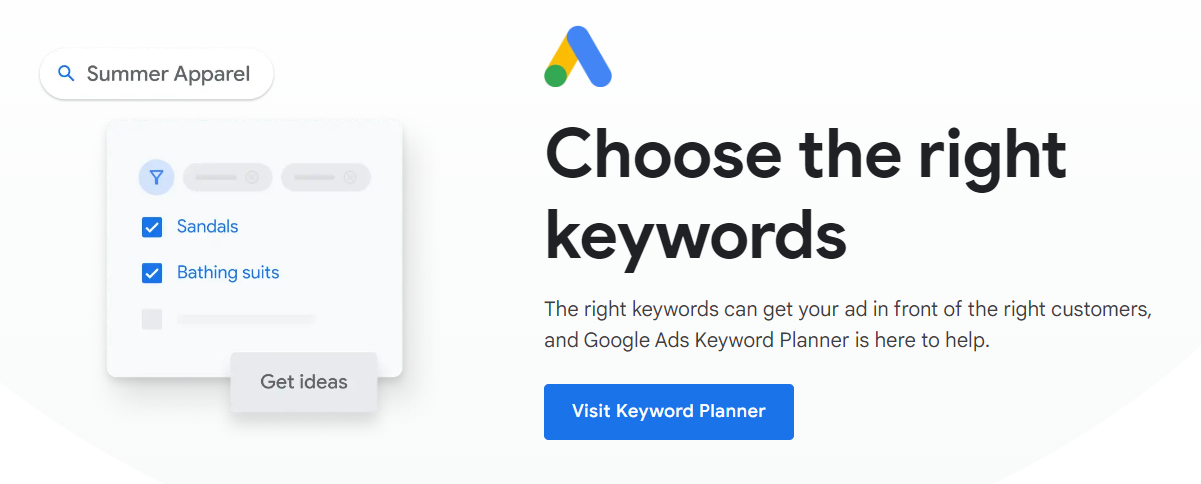
Let’s understand the process with the help of a hair care product example. These products are vegan, natural, and free of parabens and sulphates.
The target audience is women or people with wavy, curly, frizzy hair who are looking for natural products to condition their hair.
We’ll start the process of finding keywords. You can build a list of keyword ideas with the “Discover new keywords” option:

- Click on ‘Discover new keywords.’
- Now, you must enter keywords or a website or go for both.
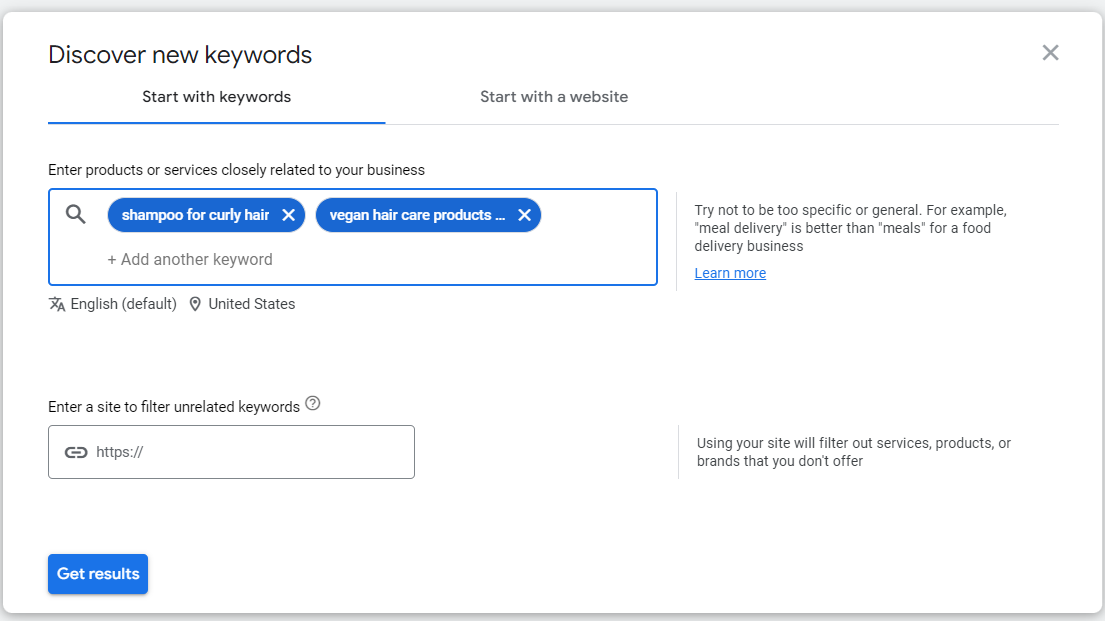
Start with keywords: Input keywords or phrases relevant to your product. You can input two or more.
Start with a website: This option allows you to provide your website or a competitor’s website to generate a list of keywords relevant to the domain.
Start with both: You can choose both options to get highly relevant keywords for your products and website.
For the hair care products, we can go with keywords like:
“shampoo for curly hair”
“Vegan hair care products”
“conditioner for wavy hair”
“natural hair care products for curly hair,” and so on.
This gives us a list of more than 2,482 potential keywords.

| BONUS: Here’s a list of the top 500 e-commerce keywords chosen for you. This list has highly profitable keywords, making your search easier. |
2. Refining Your Keyword List
In this step, let’s narrow our keyword list to make it more relevant and targeted towards products and customers.
In Google Keyword Planner, you can filter results for brands and product types with the “Refine Keywords” section. You will find it at the bottom of the right side of the ‘keyword ideas’ section.

We can filter between different brands or remove all brands from the list.

Filtering keywords allows us to focus on bidding on branded keywords while preventing our ads from appearing for non-branded searches.
You can also use the ‘Categories’ option. This allows advertisers to create ad groups based on search queries or specific types of products.

We can create ad groups for curly hair care products and exclude products related to frizzy or wavy hair. By filtering, we have narrowed our search to 1136 keywords targeted towards your products.

We have completed choosing the keywords. Now, let’s bid on them.
3. Set Budget and Bids
The first step here is setting the campaign budget. You can use:-
- Average Daily Budget: The average amount of money you are ready to spend on a campaign.
- Shared Budget: The average amount is shared across multiple campaigns.
But the question is, how do we know to set a specific amount?
The answer is Bid Estimates.
Bid estimates tell you how much other advertisers have bid for the same or similar keywords. These estimates are based on the amount advertisers have spent in the past.
Bid estimates are helpful:-
- To plan the budget for your campaigns.
- To change the keywords bids based on competitors and market trends.
- Prioritize which keywords to rank over others based on profitability and relevance.
There are three types of bid estimates:
- Top-of-the-page bid estimate shows the higher and lower range of bids placed in the past to place ads at the top of search results.
- Low range: This estimate is the lower amount advertisers pay to secure a position at the top of search results.
- High range: This estimate is the higher amount advertisers pay to secure a position at the top of search results.
- First-page bid estimate: The amount advertisers have paid to place ads on the first page of search results
- First position bid estimate: The amount advertisers have paid to rank first.
In the curly hair products example:-
You can see keywords like ‘rotating curling iron.’ This keyword isn’t necessary for the products you’re selling. The highest bid is $1.93, so you can bid as low as $0.50.

4. Create Compelling Ad Copies
Have you ever stopped scrolling and noticed an ad that immediately felt relevant and made you buy?
There’s a skill behind these types of ad copies and it includes a clear and unique messaging around the product offering.
The best way to create highly converting copy is to jot down all your USPs, products, and target audiences. You can make copies or use AI tools to generate them for you.
You can use tools like:
Remember to personalize them for your specific products and target audience and consider your brand messaging and values.
Here are a few things to remember when creating an ad copy:
- Write a Google Ads copy naturally incorporating keywords that you’re bidding on.
- Include elements like a landing page and HD-quality images to grab attention.
- Another crucial part of creating ad copy is using powerful call-to-action buttons. These are the buttons that make potential customers click and buy your products. Examples of CTAs are: ‘Buy Now’, ‘50% off’, and so on.
We’ve come to the last step of the process.
5. Test Your Campaigns
Perform A/B tests for your ad copies to determine which version of your ad generates higher conversions.
Test for elements like headline, CTA, image, or description. Based on the results, you can mix, match, and choose one.
Types of Keyword Bidding Strategies
Google Ads offers three types of keyword bidding strategies: Manual Bidding, Automated Bidding, and Smart Bidding. These strategies differ in ad objective and mechanism and require various levels of expertise.
Additionally, picking a keyword bidding strategy allows you to take an approach to measure the performance of your ads.
| Manual Bidding | Automated Bidding | Smart Bidding |
| The advertiser adjusts all bids manually at the campaign, keyword, or ad group levels. | Google automatically sets a bid based on the probability of an ad receiving clicks or conversions. | Smart bidding uses advanced machine learning and proprietary data to set bids and maximize conversions and conversion value. |
| You can manually divide your bids keyword by keyword. | Google automates the bidding for a position on the SERP, clicks, conversions, conversion value, views, impressions, and email openings. | Smart bidding is a real-time bidding strategy. Every time an auction runs, Google decides the specific bid based on your goal. |
| It requires a lot of time, patience, and PPC expertise. | It saves your time by automating the bidding process. | Smart bidding is part of automated bidding and saves time. |
| You can quickly implement changes based on performance data. | Changes made in Google ads campaigns take time to reflect. | Smart bidding has a learning phase. If you make any changes, it goes back to learning; thus, it takes time to reflect on the changes. |
| It is ideal for advertisers with complete control and a limited budget. | It is ideal for advertisers managing significant or multiple PPC accounts. | It is ideal for large and small businesses. It is also suitable for new campaigns, as it optimizes based on data. |
In Google Ads, when creating a campaign, you are asked to set a bidding. The focus of your bidding differs for each campaign type.
For example:- If you choose performance max campaign, you will be given options like conversions and conversions value, and for search campaigns, along with conversions, you will also see clicks, impressions, and more. You can utilize assets and audience signals to optimize a pmax campaign for improved metrics.
Most advertisers choose sales as their goal, and that is why we will learn more about conversions, conversion value, and enhanced cost per conversion.

1. Manual Cost-Per-Click
Using this manual bidding strategy, you can set or adjust bids for different ad groups or keywords.
You have complete control over the campaign, requiring you to monitor performance to adjust bids.
| NOTE: By default, you will see that Google checks the enhanced CPC box, so you must uncheck it to select the manual CPC option. |
2. Enhanced Cost-Per-Conversion
eCPC is a combination of manual and automatic bidding. You set the manual bids, and then Google automatically adjusts them to increase the conversion rate without increasing the cost per conversion.
eCPC adjusts your bids for every relevant search your ad appears for based on the probability of a click that leads to conversion.
3. Maximize Conversions
Maximize Conversions is a fully automated Smart Bidding strategy. It uses advanced machine learning to automatically optimize bids to get the most conversions for your campaign while spending your budget.
It works by implementing historical data of your campaigns and assessing information at the time of auction. It adjusts bids for every auction.
4. Maximize Conversion Value
This keyword bidding strategy focuses on conversion value and is part of an automatic bidding strategy. It uses advanced machine learning. This keyword bidding strategy looks at the likelihood of a conversion and the likely value that the conversion will have.
For example, the hair care products company’s average order value is $40. Some pay $40, some pay $80, and some pay $20. This strategy ensures that the company focuses on the $80 order value, thus maximizing conversion value.
5. Target Cost Per Acquisition (tCPA) and Target Return On Ad Spend ( tROAS)
When you choose the focus of bidding as conversions and conversion value, respectively, you will be asked to set tCPA and tROAS.

Target Cost Per Action (tCPA) is a Smart Bidding strategy that uses Google’s advanced machine learning to automatically set the bid for each auction. The aim is to maximize the number of conversions at or below the target cost per action (CPA) you have set.
For example, if your target CPA is $50, the system will try to have you pay for $50 in clicks before getting a conversion.
| NOTE: Cost Per Action is the same as Cost Per Conversion. |
Target Return On A Spend (tROAS): ROAS measures your business’s revenue for each dollar spent on advertising. tROAS is the value you set by asking Google to bring you x times $ for every $1 spent.
It is similar to tCPA, where tCPA maximizes conversions, and tROAS maximizes conversion value.
| NOTE: Both tCPA and tROAS need a lot of data to perform effectively and calculate the results accurately. |
That is why a Google Ads expert advises setting these targets a bit late after the campaign is live. If you set them initially, you will not be aware of the results as this is a new campaign, and the campaign’s performance keeps fluctuating in the beginning.
So, achieving stable performance and receiving a stable return on ad spend takes time. That’s when you set the targets. So, the right time is when you receive enough data to set the target.
Best Practices for Keyword Bidding in Google Ads
- Select the proper conversion tracking tool that gives you accurate performance data.
- Make data-driven decisions with regard to adjusting bids.
- Check if the attribution model is appropriate for your campaign goals, and make sure it’s audited. Here’s a detailed guide on how to perform Google ads audit.
| What is the Attribution Model? Understanding how customers interact with your ad campaigns and which touchpoints bring conversions is important to measuring the effectiveness of ads. This is where the attribution model plays a key role. It is the process of assigning credit to various marketing channels or touchpoints that have contributed to a user’s conversion or action. It analyzes data on user behavior, such as app installs, in-app purchases, clicks, and impressions, and then tracks the source of that behavior back to specific marketing efforts. Attribution models help businesses understand performance. There are six types of Google Ads attribution models. Last-click attributionFirst-click attributionPosition-based attributionLinear attributionTime decay attributionData-driven attribution |
- Consider your goals and choose a keyword bidding strategy to meet your business needs.
- Ensure that you A/B test your keyword bidding strategies before choosing one.
| Bonus: Learn how to use Google Ads Auction Insights report. |
Conclusion
Keyword bidding goes beyond keyword research. Bidding on keywords is a continuous process that requires you to stay on top of market trends and research the competition.
Remember to optimize campaigns based on performance data and test ads, and choose a strategy that aligns with your business goals.
FAQs
What is a bid on keywords?
Bid on keywords or PPC bid is the amount advertisers are willing to pay to secure the first position for their ad. Advertisers bid on specific keywords or a group of keywords. The auction happens among the advertisers who bid on the same or similar keywords.
how to bid on keywords?
You can follow the process below:
Firstly, choose the right keywords for your business. Refine the keyword list, exclude irrelevant keywords, and add negative keywords. Then, set your campaign budget and bid on keywords. Then, create ad copies, use images, keywords, and landing pages. Lastly, test the campaigns, perform A/B testing, and choose the best version of the ad to publish.
What is a keyword auction?
A keyword auction is the process through which Google assesses the ads to show them in the search results. It also decides the order of the ads in the search engine and whether an ad appears or not in the search results.
How does keyword bidding impact ad placement?
Keyword bidding plays a crucial role in deciding ad placement. Google checks whether the keyword chosen by an advertiser is relevant to the user’s query—other factors, such as Quality score and ad rank, impact ad placement.
How can I optimize my keyword bids for better ROI?
Tailor your ad for location-specific, add negative keywords, use long tail keywords, keep testing ad copies, improve the ad’s quality score, and track conversions without fail.
What tools can I use for keyword bidding and analysis?
Keyword research and analysis tools include Google Keyword Planner, Moz keyword difficulty tool, Semrush, and Ahrefs. These tools can help you find the right keywords for your business.
How often should I adjust my keyword bids?
You can optimize your keyword bids daily or based on impressions. You can increase the bid during certain hours to run promotional offers. If impressions are the same on all days, you can lower your keyword bids.
Check Out These Related Articles:


